ViDesk Ltd
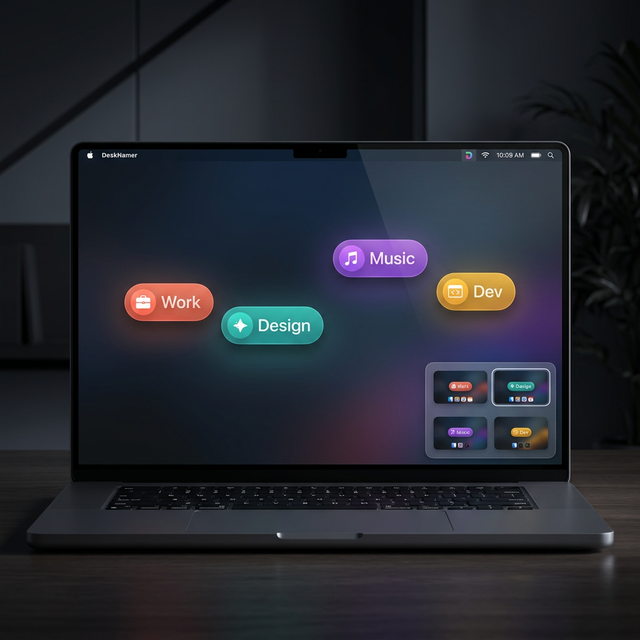
DeskNamer adds a floating name label to each of your Mac desktops — custom colour, icon, and text. A compact switcher widget lets you jump between spaces at a glance. No more guessing which desktop you're on.
Requires macOS 14 Sonoma or later · Apple Silicon & Intel · Direct download
Features
Thoughtful defaults. Deep customisation when you want it.
Give each desktop a meaningful name — "Work", "Design", "Dev", whatever fits your flow. Names persist across reboots.
Assign a distinct background colour and text colour to each space. Spot which desktop you're on instantly, even mid-animation.
Pick any SF Symbol for each desktop from Apple's full icon library. Hundreds of options from a searchable picker.
A draggable, always-on-screen widget shows all your desktops as tiles. The active space glows. Click any tile to jump instantly.
The current desktop name and icon live in your menu bar. One-click access to all settings without breaking your flow.
100% local. No cloud, no account, no telemetry. Your workspace data never leaves your Mac.
How it works
Install DeskNamer, open the menu bar extra, and immediately start naming your desktops. Each name sticks — it's tied to the desktop's UUID, so renaming is permanent until you change it again.
Install and launch DeskNamer — it lives quietly in your menu bar.
Click each desktop in the list and type a name, choose a colour and icon.
Enable the switcher widget and drag it where you want it. Done.
DeskNamer will be available as a one-time purchase at £7.99. No subscription. No upsell. Yours forever, including all future updates.
macOS 14 Sonoma or later · Apple Silicon & Intel · Direct download & Mac App Store coming soon